Holiday Gift Budget Tracker (Free Spreadsheet)
Built in-house and tested before publishing. No signup required.
Download the tracker (.xlsx)Holiday spending doesn’t blow up on one big purchase. It blows up sixteen small times, five dollars over here, twenty over there, until the total surprises you in January. This tracker puts a budget next to every name on your list, so the drift shows up in real time instead of on a credit card statement.
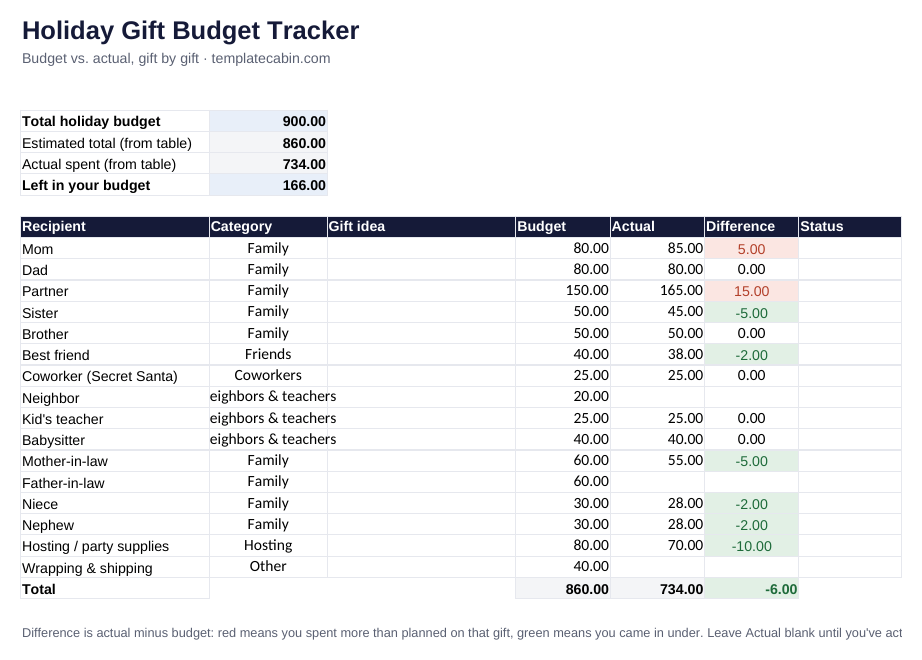
What’s inside
- One total-budget input that shows what’s left as you log actual purchases
- A row per recipient, with category, gift idea, budget, and actual spend
- Automatic red or green color coding on the Difference column, so an over-budget gift is visible the second you enter it
- A status column to mark each gift Idea, Bought, or Wrapped
- A worked example, verified against independent math: a $900 budget across 16 recipients with $166 left after 13 of 16 gifts are bought
How to use it
- Enter your total holiday budget in the top box. The example uses $900.
- List everyone you’re buying for, one row each, and set a budget per person before you shop.
- Fill in Actual once you buy the gift. The Difference cell turns red if you went over, green if you came in under.
- Leave Actual blank until money has actually moved. The example still shows the neighbor, father-in-law, and wrapping and shipping as budget-only.
Google Sheets: File, Import, Upload, then “Replace spreadsheet”.
What the example teaches
The biggest overspend rarely comes from the biggest budget. In the example, the $150 gift for a partner runs $15 over, but that’s only 10%. Meanwhile a few small gifts land right on budget or under, which is what keeps the whole list from tipping into the red. Color coding makes that balance visible without adding up anything by hand.
A line for hosting and a line for wrapping and shipping matter more than people expect. They’re easy to forget when budgeting gift by gift, and they’re exactly the kind of category that turns a tidy list into a surprise total if it’s left out from the start.
Common questions
Should I round budgets up or down? Round up slightly on gifts you haven’t shopped for yet. It’s easier to land under budget and see green than to explain red later.
Group gifts or Secret Santa? Enter your share as one row. If you’re collecting money from others, track that separately; this sheet measures what leaves your account.
Is it free? Yes, no signup. General information, not financial advice. Spot an error? Tell us and we’ll retest and fix it.
Grab the file and follow the setup steps above. It takes about two minutes.
Download the tracker (.xlsx)