Wedding Budget Template (Free Spreadsheet)
Built in-house and tested before publishing. No signup required.
Download the template (.xlsx)Weddings don’t go over budget in one big moment. They go over budget in sixteen small ones. A florist quote that creeps up, a “just one more” favor, a deposit you forgot to log. This template puts every category on one page next to what you actually spent, so the drift shows up while you can still do something about it.
What’s inside
- One total-budget input that instantly shows what’s left, updated as you fill in actuals
- 16 pre-built categories, from venue and catering to rings and the buffer line everyone forgets
- An estimated vs. actual column for every line, so overspending in one place is visible next to savings in another
- A status column to mark each vendor Paid, Deposit paid, or Not paid yet
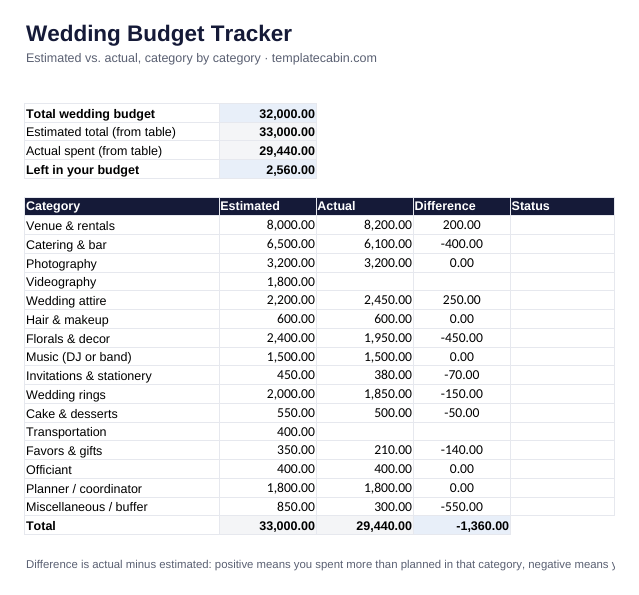
- A worked example, verified against independent math: a $32,000 budget with $2,560 left after 14 of 16 vendors are booked
How to use it
- Enter your total budget in the top box. The example uses $32,000.
- Fill in your estimate for each category as you get quotes, even rough ones. Guessing high on the unknowns beats leaving them blank.
- Fill in Actual once a deposit or full payment goes out. The Difference column does the subtraction for you.
- Leave a category’s Actual blank until money has actually moved. The example still shows Videography and Transportation as estimate-only.
Google Sheets: File, Import, Upload, then “Replace spreadsheet”.
What the example teaches
The categories that blow past their estimate are rarely the biggest ones. In the example, Venue comes in only $200 over, but Wedding attire runs $250 over on a much smaller base, a bigger miss in percentage terms. Small categories deserve real estimates too, not placeholder guesses.
The buffer line matters more than it looks. $850 set aside for “miscellaneous” is what keeps a $200 venue overage and a $250 attire overage from turning into a budget crisis. Build the buffer in from day one, the same logic as a sinking fund for the categories you can’t fully predict yet.
Common questions
Should the buffer be a fixed amount or a percentage? Either works. A common rule of thumb is 5 to 10% of the total budget; the example uses roughly 2.5%, which is lean, so pad yours if your vendor list is still uncertain.
Two people, two payers? Add a note in the Status cell, like “Deposit paid, split”, or duplicate the sheet per payer if you’re tracking contributions separately.
Is it free? Yes, no signup. General information, not financial advice. Spot an error? Tell us and we’ll retest and fix it.
Grab the file and follow the setup steps above. It takes about two minutes.
Download the template (.xlsx)