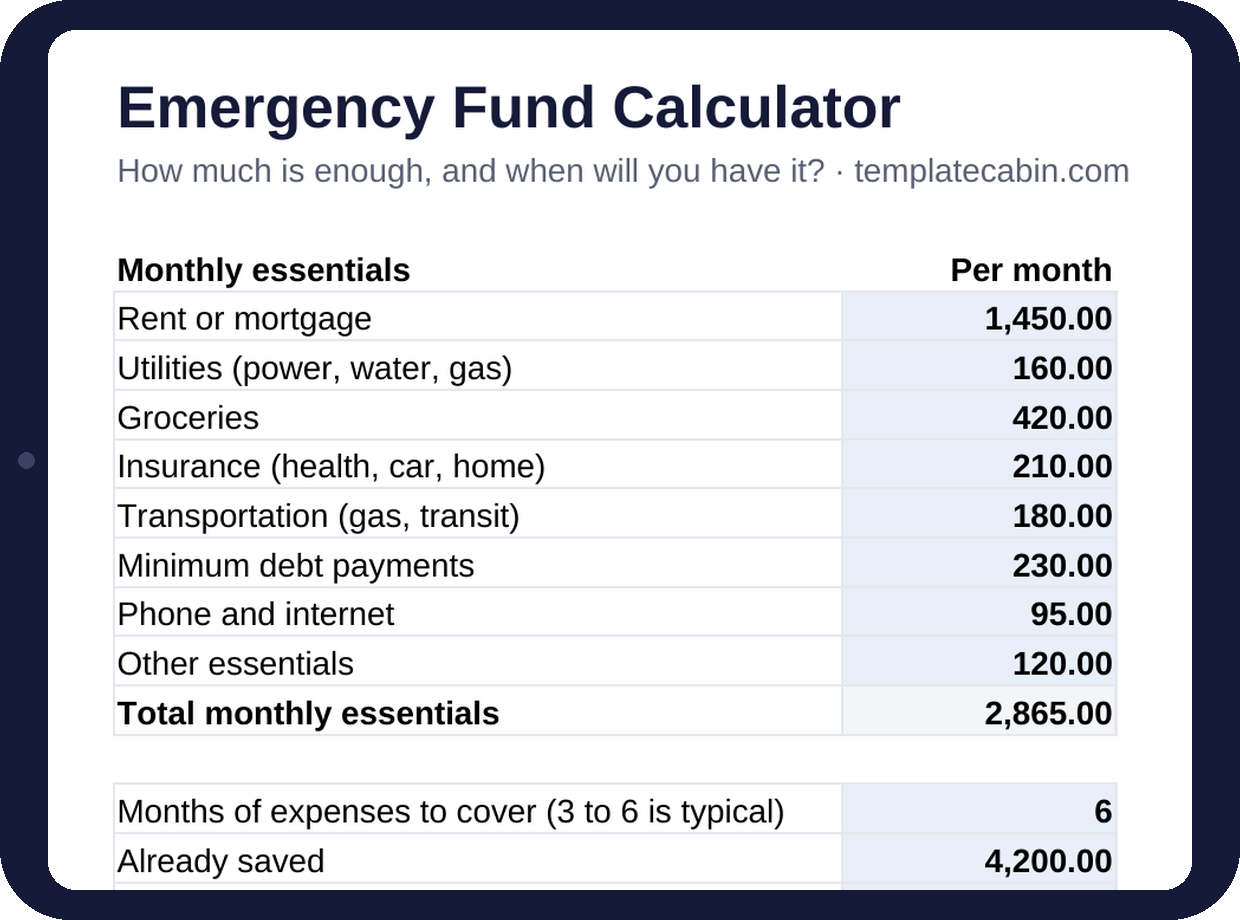
“Three to six months of expenses” is the advice everyone has heard, and almost nobody has turned into an actual number. The reason is that the number depends on a question most people have never answered precisely: what would you still have to pay if your income stopped tomorrow? This sheet asks that question line by line, multiplies the answer out, and then does the part the advice always skips, which is telling you when you’ll actually get there.
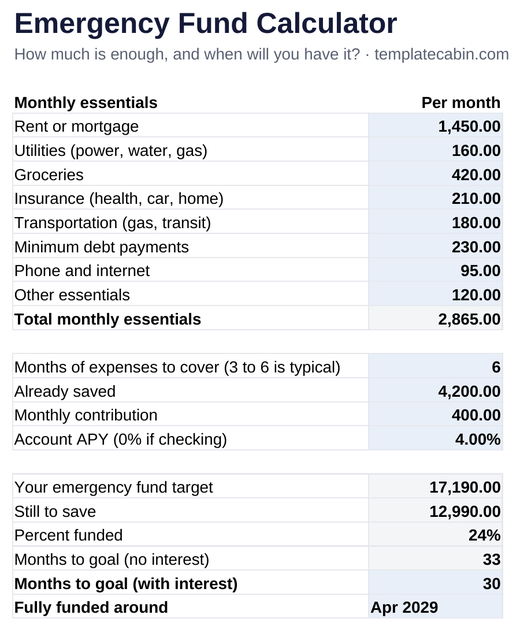
The top section is a short list of monthly essentials: rent or mortgage, utilities, groceries, insurance, transportation, minimum debt payments, phone and internet, and a line for whatever else is truly non-negotiable. Only the blue cells need filling in. Below that you choose how many months to cover, enter what’s already saved, your monthly contribution, and the APY wherever the money sits. The results block computes your target, what’s still to save, the percent funded, and months to goal both with and without interest, ending in an arrival month that recalculates from today each time the file opens.
The worked example runs $2,865 a month in essentials against a six-month target, which lands at $17,190. With $4,200 already saved, the fund is 24% there, and at $400 a month in a 4% account it takes 30 months, arriving around spring 2029, versus 33 months with no interest at all. Every one of those numbers is a live formula, and each was checked independently before publishing.
The most useful thing the example shows is how much the essentials list matters compared to everything after it. Most people’s first instinct is to plug in their whole monthly spending, which in this household might be closer to $4,500, and get a six-month target near $27,000 that feels impossible and quietly gets abandoned. Essentials only, the kind of spending that survives a job loss with the streaming services and restaurants already cut, is what the fund is actually for, and $17,190 is a number a person can picture reaching. If the target still looks far off, change the months cell to 3 before you change anything else; a three-month fund that exists beats a six-month fund that’s still a plan.
Which cell to push is also visible right on the page. Bumping the contribution from $400 to $500 pulls the arrival date in by five months, from 30 to 25. Moving the account from 4% to 5% APY doesn’t change the month at all; the rounding swallows it. The interest line is still worth having, since parking a multi-year fund in a checking account earning nothing really does cost three months in this example, but the contribution is where the date actually lives.
A few practical notes. Keep the fund in its own account, ideally a high-yield savings account you can reach in a day or two but not from the card you buy groceries with; money that’s mixed in with everyday cash gets quietly raided. Minimum debt payments belong in essentials because they don’t pause when income does, while extra payments don’t, since you’d stop those first. Update “already saved” each time you contribute and the percent funded ticks up, which turns out to be most of the motivation. Once the fund hits 100%, the monthly contribution has an obvious next job in a savings goal or an extra debt payment, and predictable irregulars like car repairs and annual insurance are better handled by sinking funds so the emergency fund stays for actual emergencies. It works the same in Google Sheets (File, Import, Upload, then “Replace spreadsheet”). Free, no signup. This is general information, not financial advice. Spot an error? Tell us and we’ll retest and fix it.
Grab the file and follow the setup steps above. It takes about two minutes.
Download the calculator (.xlsx)